EASTEL Top Up – Reload Your Airtime Credit Instantly
How to Top Up Your EASTEL Account
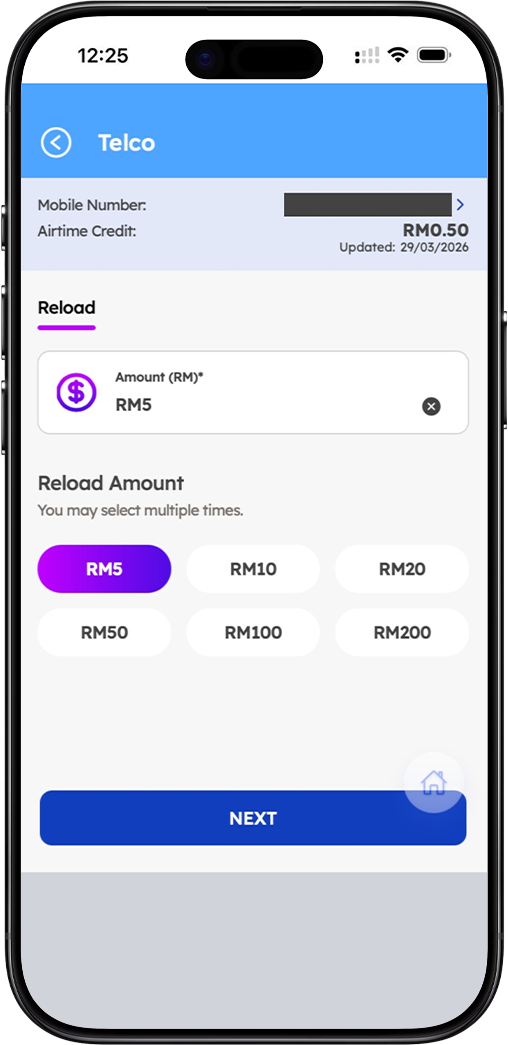
Step 1: Enter Your EASTEL Mobile Number
To begin your EASTEL top up, first ensure you have your EASTEL mobile number ready. On the EASTEL reload page, you will see a field to enter your mobile number with the Malaysia country code (+60). You can either enter your own number or select from previously saved numbers. If you are reloading for someone else, there is an option to enter a different EASTEL number under "Reload for Other Numbers." Simply input the 10-11 digit mobile number (e.g., 60123456789) and proceed to the next step.
Step 2: Select Your Reload Amount
After confirming the EASTEL mobile number, you will choose your reload amount. EASTEL offers flexible reload options starting from a minimum of RM5. You can select from preset amounts: RM5, RM10, RM20, RM50, RM100, or RM200. If you need a different amount, you may also enter a custom value. The reload amount can be selected multiple times if you wish to add more credit in a single transaction. Your current airtime credit balance will be displayed for reference, showing the last update date.
Step 3: Choose Your Payment Method
EASTEL provides multiple secure payment options to suit your preference. You can pay using Debit or Credit Card (Visa, Mastercard), Online Banking via FPX (Financial Process Exchange) which supports all major Malaysian banks, or Other E-wallets such as Touch 'n Go eWallet, GrabPay, and Boost. If you have an EASTEL Wallet, you may also use your wallet balance as a payment method, provided you have sufficient funds.
Step 4: Review Order Summary and Complete Payment
Before finalizing your EASTEL top up, review the Order Summary which displays your total amount, any applicable discounts, and the final amount to pay. Once confirmed, click the "PROCEED PAY" button to complete the transaction. You will be redirected to your chosen payment gateway to authenticate and authorize the payment. After successful payment, your EASTEL airtime credit will be topped up instantly, and you will receive a confirmation SMS.
Reload for Other EASTEL Numbers
Step 1: Access the "Reload for Other Numbers" Option
EASTEL makes it easy to top up credit for family members, friends, or colleagues. On the reload page, look for the "Reload for Other Numbers" section. This feature allows you to add airtime credit to any EASTEL mobile number without needing to log into that person's account. It is perfect for parents reloading for children, friends helping each other, or businesses providing credit to employees.
Step 2: Enter the Recipient's EASTEL Mobile Number
In the designated field, enter the recipient's EASTEL mobile number in the format e.g., 601169070051 (including the country code without the "+" sign). Double-check the number to ensure accuracy, as reloads cannot be reversed once processed. If you have previously reloaded for the same number, you may also select from your reload history for convenience.
Step 3: Confirm and Complete the Reload
After entering the recipient's EASTEL number, select the reload amount and payment method as usual. Review all details carefully — the recipient's number, reload amount, and payment method — before proceeding with payment. Once confirmed, the airtime credit will be instantly added to the recipient's EASTEL account. Both you and the recipient will receive SMS notifications confirming the successful top up.
EASTEL Wallet – Alternative Payment Method
What is EASTEL Wallet?
EASTEL Wallet is a built-in digital wallet within the EASTEL ecosystem that allows you to store funds for quick and convenient reloads. You can top up your EASTEL Wallet balance separately and use it to pay for airtime credit reloads, data add-ons, and other EASTEL services. The wallet balance is displayed in your account dashboard and can be viewed at any time.
How to Use EASTEL Wallet for Reload
When making a reload, you can select EASTEL Wallet as your payment method. The system will check your current wallet balance. If your wallet balance is sufficient, you can complete the payment instantly without needing to enter card or banking details. If your wallet balance is insufficient, you will be prompted to reload your wallet first by clicking the "+ Reload Wallet" button. This two-step process ensures you always have the option to use your wallet for future transactions.
Benefits of Using EASTEL Wallet
Using EASTEL Wallet for reloads offers several advantages: faster checkout without re-entering payment details, better tracking of your spending history, and exclusive promotions that may offer discounts or cashback when using wallet balance. Additionally, EASTEL Wallet provides an extra layer of security as you do not need to share your card details for every transaction.
Payment Methods Accepted by EASTEL
Debit and Credit Card (Visa, Mastercard)
EASTEL accepts all major debit and credit cards for reload payments. Simply select the card option, enter your card details, and authenticate the transaction using 3D Secure (Verified by Visa or Mastercard SecureCode). Your payment is processed through secure, PCI-compliant payment gateways to ensure your financial information remains protected.
Online Banking via FPX
For users who prefer direct bank transfers, EASTEL supports FPX (Financial Process Exchange), Malaysia's leading online banking payment system. FPX allows you to pay directly from your bank account without needing a credit card. Supported banks include Maybank, CIMB Bank, Public Bank, RHB Bank, Hong Leong Bank, AmBank, and many others. Simply select your bank, log in to your online banking portal, and authorize the payment.
Other E-Wallets
EASTEL also accepts payments from popular e-wallets in Malaysia, including Touch 'n Go eWallet, GrabPay, Boost, and ShopeePay. This option is ideal for users who prefer to manage their finances through digital wallets. Simply select your preferred e-wallet, and you will be redirected to the e-wallet app to complete the payment securely.
Important Information About EASTEL Reload
Minimum Reload Amount
The minimum reload amount for EASTEL prepaid accounts is RM5. This low minimum makes it convenient for users who need a small top up to extend validity or make a few calls. You can reload in increments of RM5, RM10, RM20, RM50, RM100, or RM200, or choose a custom amount that suits your budget.
Reload Validity and Expiry
When you reload your EASTEL account, the airtime credit added does not expire as long as your account remains active. However, your prepaid account validity is determined by your active plan or the last reload date. To keep your EASTEL number active, ensure you perform a reload or subscribe to a plan before your validity period ends. Unused credit will remain in your account even after validity expires, but you will need to reload to reactivate services.
Instant Credit Addition
All EASTEL reloads processed through the official portal are added to your account instantly. Once payment is confirmed, the airtime credit will reflect in your balance immediately. You will receive an SMS confirmation from EASTEL verifying the successful top up. If you do not receive confirmation within a few minutes, please check your transaction status or contact EASTEL customer support.
Reload Confirmation and Receipt
After completing a successful EASTEL top up, you will receive a confirmation SMS to your EASTEL mobile number. For online banking and card payments, you will also receive a payment receipt via email if you provided an email address during checkout. You can also view your reload history and transaction records within the EASTEL Super App for your reference.
Frequently Asked Questions About EASTEL Top Up
Can I reload my EASTEL account for someone else?
Yes, EASTEL allows you to reload airtime credit for any EASTEL mobile number. Simply use the "Reload for Other Numbers" feature, enter the recipient's EASTEL number, select the reload amount, and complete payment. This is perfect for parents, friends, or employers who need to add credit for others.
What payment methods are accepted for EASTEL reload?
EASTEL accepts a variety of payment methods including Debit/Credit Card (Visa, Mastercard), Online Banking via FPX (supported by all major Malaysian banks), and popular E-wallets such as Touch 'n Go eWallet, GrabPay, and Boost. EASTEL Wallet balance can also be used if available.
Is there a minimum reload amount for EASTEL?
Yes, the minimum reload amount for EASTEL prepaid accounts is RM5. This allows you to top up small amounts when you only need to extend validity or make essential calls. Larger reload amounts up to RM200 are also available.
How long does it take for reload credit to appear?
EASTEL reloads are processed instantly. Once payment is successfully completed, the airtime credit will be added to your EASTEL account immediately. You will receive an SMS confirmation shortly after the transaction.
What should I do if my reload does not go through?
If your EASTEL reload does not reflect after payment, first check your transaction status with your bank or e-wallet provider. Ensure you entered the correct EASTEL mobile number. If the issue persists, contact EASTEL customer support with your transaction reference number for assistance.
Reload Your EASTEL Account Now
Top up your EASTEL airtime credit instantly. Choose from RM5 to RM200. Pay with debit/credit card, online banking, or e-wallets. Reload for yourself or others. Fast, secure, and reliable.
